
Your roster, care records, claims and pay run, in one system.
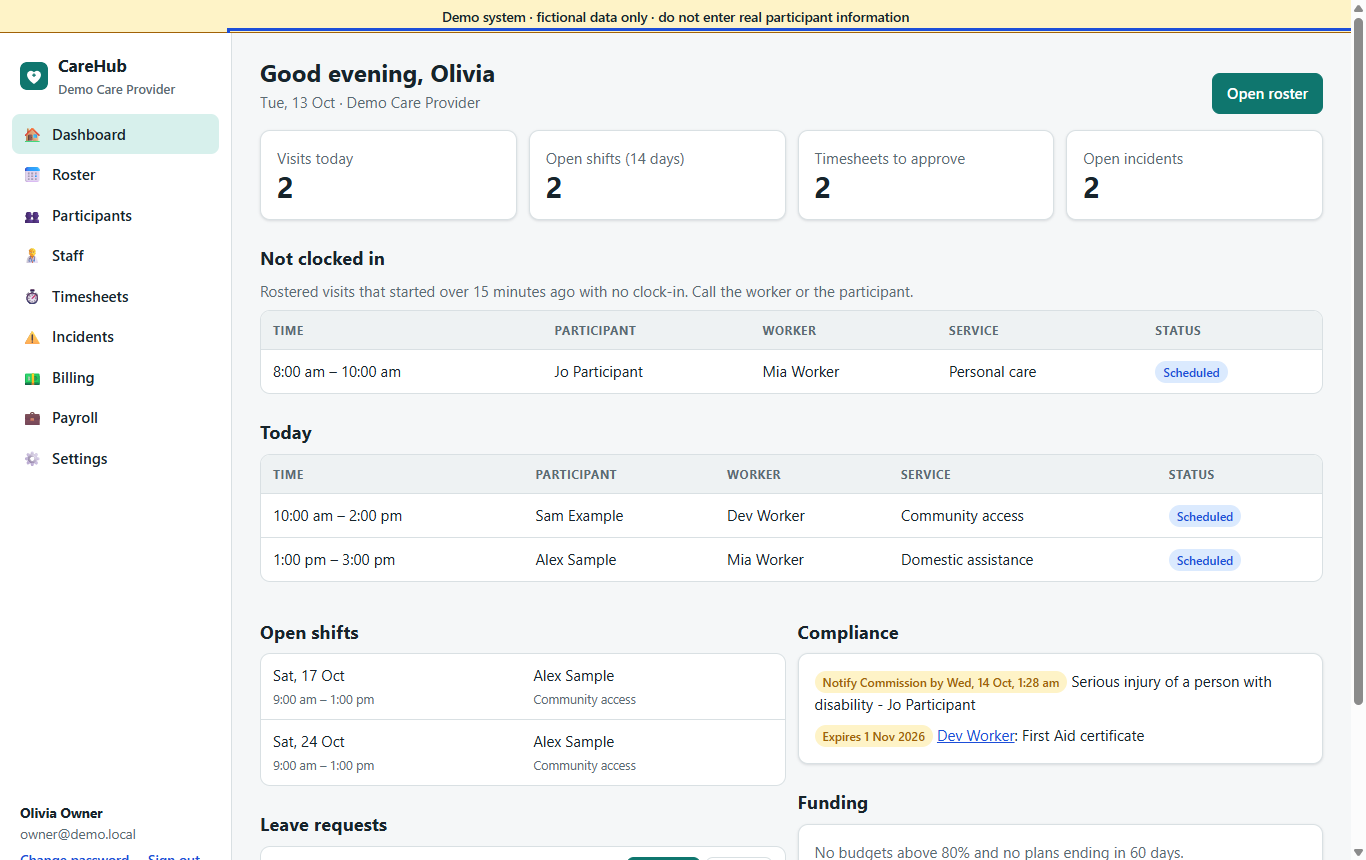
CareHub replaces the spreadsheets, group chats and re-typing between rostering, visit notes, invoicing and payroll. Support workers get a simple phone app; the office gets everything checked before money moves.
- Workers can't be rostered with an expired mandatory check, such as the NDIS Worker Screening Check
- Visits recorded by GPS clock-in, notes and the participant's sign-off, even without signal
- Invoices at the NDIS price for the visit's date, a claim file, and the portal's results matched back
- NDIS price lists by date and zone
- NDIS bulk claim file
- Support at Home
- SCHADS Award pay rules
- NDIS Commission incident deadlines
- Data stored in Oceania
From roster to claim without re-typing anything
Every step feeds the next, so the visit a coordinator rosters is the visit the worker clocks, the note the family reads, the timesheet the office approves, the line on the invoice and the hours in the pay run.
Roster
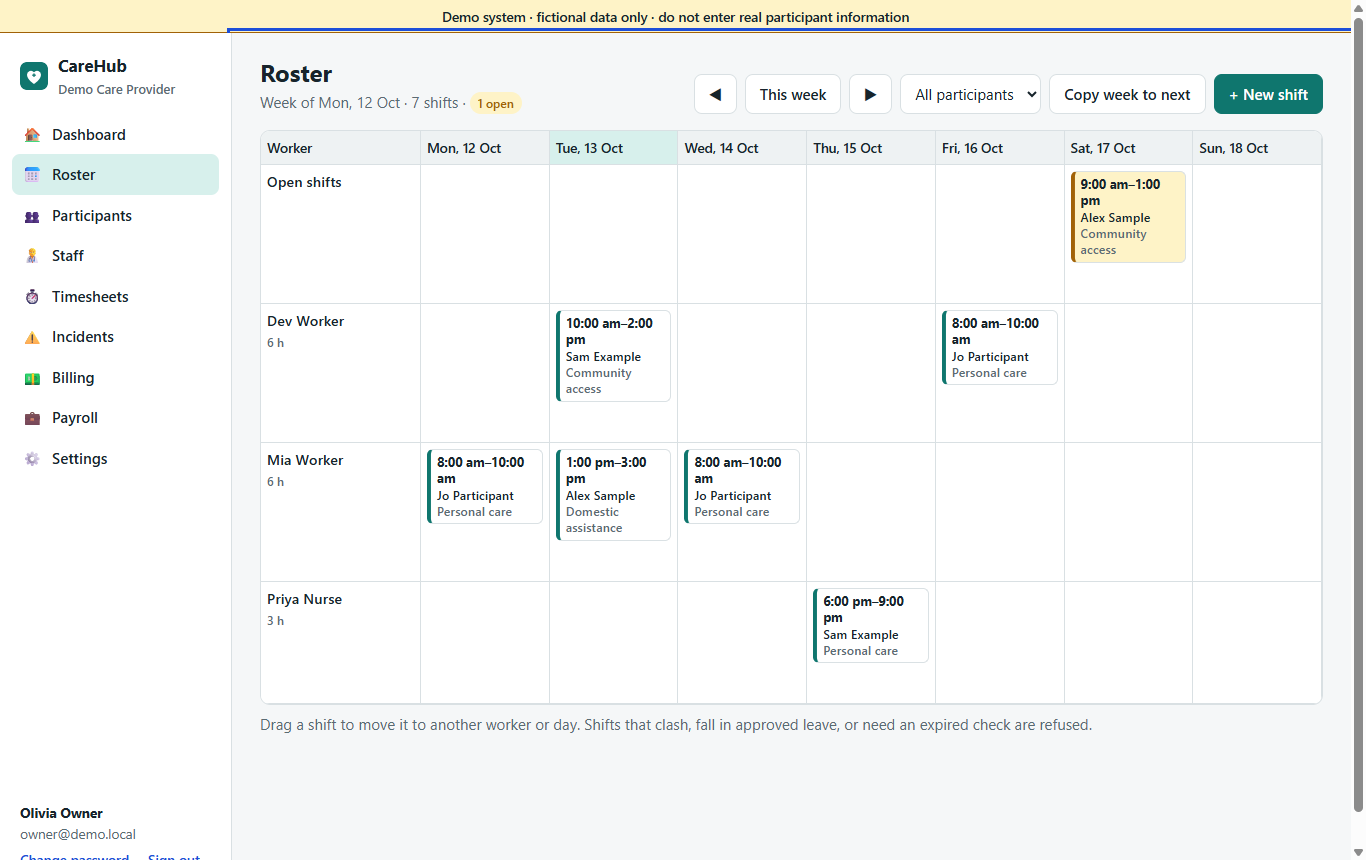
Repeating shifts, drafts you publish when ready, a job board for vacancies. Clashes, leave and expired checks are refused.
Visit
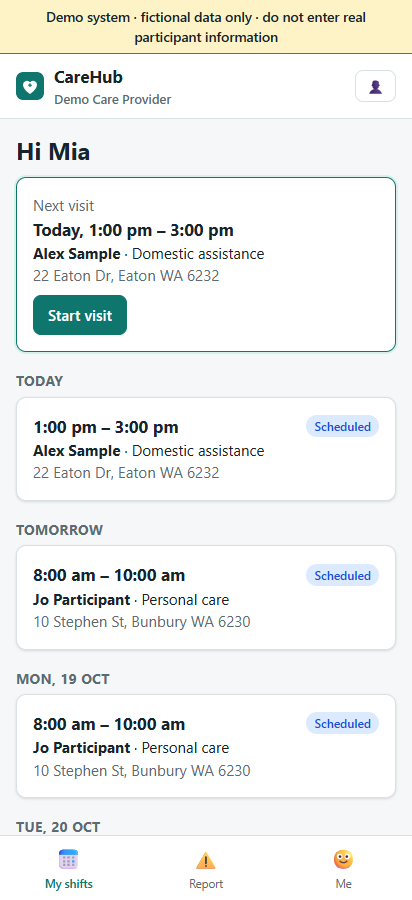
The worker clocks in by GPS, sees the care plan tasks and medication due, writes the note and collects a signature.
Approve
The office compares rostered and actual times, checks the flags and approves, or lets clean visits approve themselves.
Invoice & claim
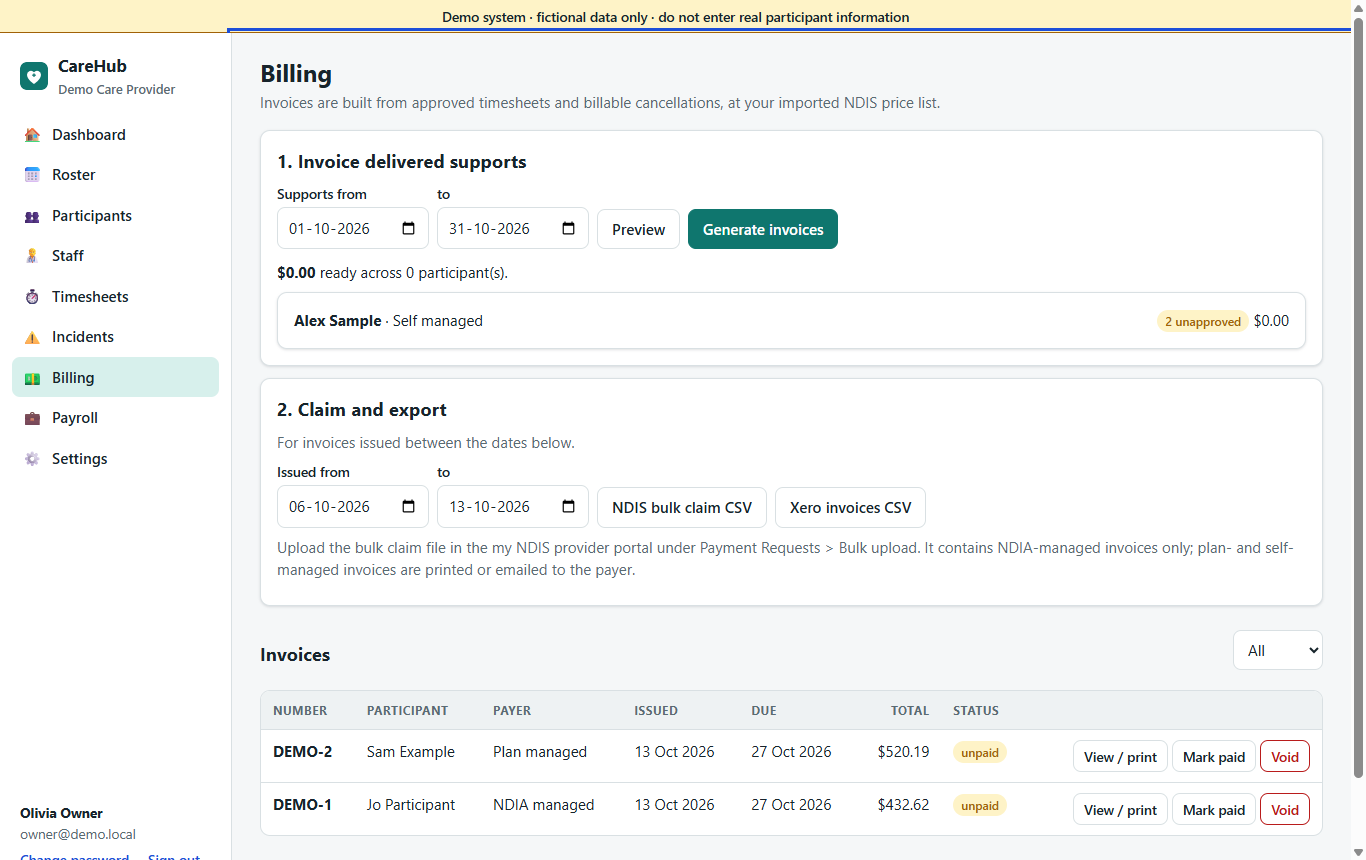
Approved visits become invoices at the right price, a claim batch for the NDIA, and statements.
Pay
The same visits produce a SCHADS pay run and a file for your payroll system.
Everything a growing provider runs on, in one login
Rostering
Week, fortnight and day views, repeating and group shifts, a job board, worker suggestions and shift recovery.
Rostering →Support worker app
Installs on Android and iPhone from the browser. GPS clock-in, notes, signatures, breaks, receipts, offline visits.
Worker app →Care management
Care plans, goals, notes, medication records, incidents, complaints and the restrictive practices register.
Care management →Funding & billing
Plans and funding periods, service agreements, invoices and payments, NDIA claims, Support at Home.
Funding & billing →Workforce & payroll
Onboarding, checks, training, availability, leave, SCHADS pay and exports for your payroll system.
Workforce →Allied health & coordination
Appointments with rooms and telehealth, and a support coordination workspace with referrals and reports.
Allied & coordination →Supported independent living
24-hour house rosters, sleepovers, rooms and vacancies, house compliance and repairs.
SIL →Family portal
Upcoming visits, shared notes, invoices and statements, and visit requests the office decides.
Family portal →Security & privacy
Two-factor sign-in, roles, a full audit log, and tools for privacy requests, retention and breaches.
Security →The mistakes an audit finds are stopped before they happen
- A worker whose mandatory check has expired cannot be put on a shift, offered one or suggested for one.
- Double bookings and shifts during approved leave are refused; fatigue rules warn or block.
- Reportable incidents start the NDIS Commission's 24-hour and 5-business-day clocks on the dashboard.
- Every change, sign-in, export and document download is recorded in the audit log.
CareHub never guesses a price or a pay rate
Prices come from the official NDIS Support Catalogue that you import, each version with the date it takes effect, so a visit is priced from the list in force on its own date. Pay rates are entered for each worker with the date they start. If anything is missing (a price, an NDIS number, a plan manager's email), that participant is held back from invoicing with the reason shown, never invoiced at a guess.
Stored in Oceania. Separated from everyone else's.
Participant records are health information. CareHub stores them in Cloudflare's Oceania region, keeps every provider's data strictly separate, and never passes it to advertising, analytics or AI services.
- Database and documents in the Oceania region
- Two-factor sign-in, always required for owners and admins
- Roles and permissions per module, with custom roles
- A request register, exports, retention dates and a breach register for your privacy duties
- No advertising trackers and no third-party scripts
Frequently asked
Who is CareHub for?
NDIS and in-home care providers in Australia: support work, SIL, allied health and support coordination, from a few support workers to teams across several regions. One login covers the office, the support workers and participants' families.
Do support workers need to download an app?
No app store is involved. Workers open a link on their phone, sign in, and add CareHub to their home screen. It works on Android and iPhone, and visits can be recorded without signal.
Our workers also work for other providers. Do they need several logins?
No. One person has one login with a membership in each organisation, and switches between them in the header. No organisation sees another's data, or which other organisations a person belongs to.
Does CareHub submit claims to the NDIA?
CareHub builds the bulk claim file in the NDIA's upload format; you upload it in the my NDIS provider portal, then import the portal's results so each line is marked paid, capped or rejected. Direct submission through the NDIA's API is not included.
Does it support aged care (Support at Home)?
Yes, on the Premium plan: Support at Home service types and your own prices, contribution rates, the quarterly budget with rollover, contribution invoices, monthly statements and a claim-lines file. Lodging the claim with Services Australia is done in their channel; CareHub does not connect to it.
Does CareHub pay our staff?
CareHub calculates the pay run under the SCHADS Award and exports it for your payroll system. It does not move money. What it does not calculate (for example sleepover active work or higher duties) is flagged with the award clause for a person to check.
What does it cost?
Prices are on request. There are four plans, and features come with the plan. See Pricing for what each includes.
Where is our data stored?
In Cloudflare's Oceania region, separated from every other provider's data. See Security & compliance and our privacy notes.
See it with your own workflow in mind
Walk through the roster, the worker app, care records, billing and payroll in a private demo with realistic (fictional) data.