
One system, from the first shift to the last claim
Each area stands on its own, and they share the same data, so nothing is typed twice and nothing falls between two systems. Which features you have depends on your plan.
Find the part of the job you care about
Support worker app
Shifts, GPS clock-in, notes, signatures, breaks, km and receipts, offline visits.
Learn more →Care management
Care plans, goals, notes, eMAR, forms, incidents, complaints, risk and restrictive practices.
Learn more →Funding & billing
Price lists, funding periods, agreements, invoices, NDIA claims, Support at Home, accounting files.
Learn more →Workforce & payroll
Staff, onboarding, checks, training, availability, leave, SCHADS pay, payroll files, documents, tasks.
Learn more →Allied health & coordination
Appointments by practitioner and room, telehealth, payers, caseloads, referrals and plan reports.
Learn more →Supported independent living
Houses, 24-hour coverage, sleepovers, weekly patterns, rooms, vacancies, compliance and repairs.
Learn more →Family portal
Visits, shared notes, worker cards, invoices, statements and visit requests.
Learn more →Security & compliance
Two-factor sign-in, roles, the audit log, privacy requests, retention and the breach register.
Learn more →Why CareHub
What is different about running everything in one system.
Learn more →Build the week in minutes, not afternoons
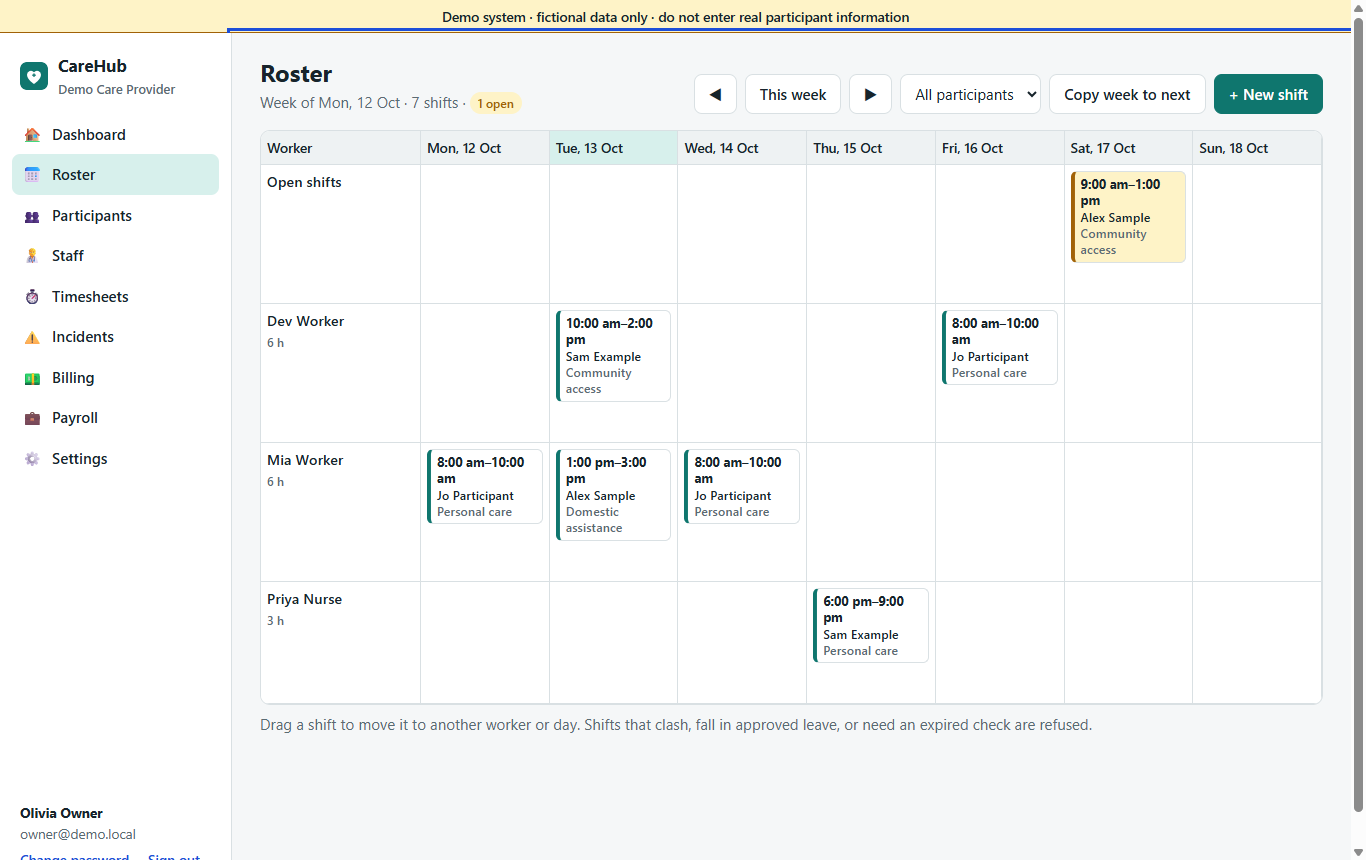
- Week, fortnight and day views, by worker or by participant, with filters, service colours and a print layout for the office wall.
- Repeating shifts (daily, weekly or fortnightly) that you change for "this visit", "this and following" or "all future visits"; copy a week or a fortnight in one go.
- Group shifts with several participants and workers, each participant billed their share; split shifts kept together for broken-shift pay.
- A start and an end place for each shift, with saved places, so a visit that ends at the day program isn't flagged.
- Optional drafts: plan the fortnight, then publish it with one message per worker.
- Refuses double bookings, shifts during approved leave, and workers whose mandatory check has expired. Fatigue rules for rest and day length warn or block, as you choose.
- State and territory public-holiday calendars you import a year at a time.
Offers, a job board and suggestions you can explain
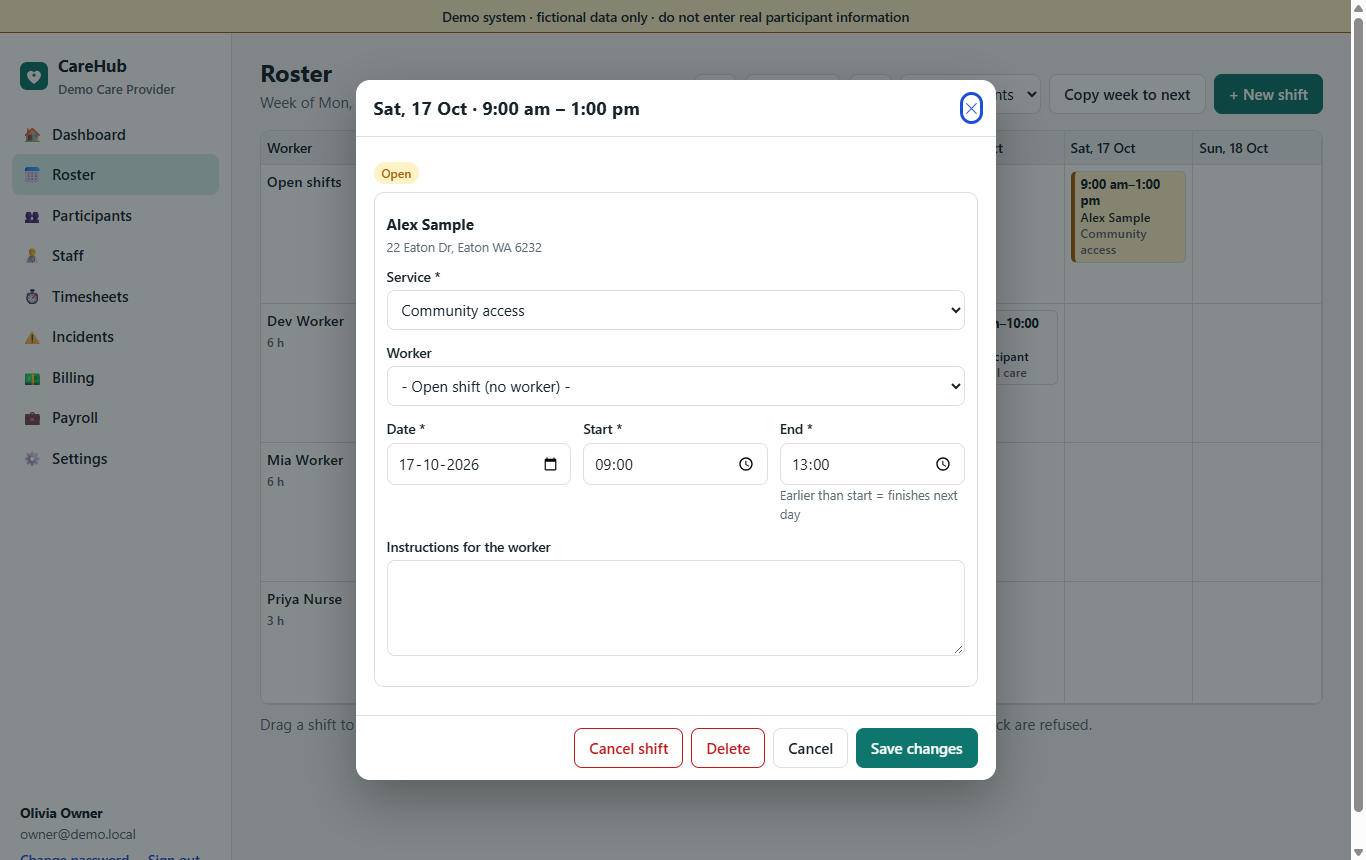
- Offers: offer a shift and the worker accepts or declines in the app; a day-before confirmation; reschedule and swap requests the office approves; no-shows recorded.
- Job board: say who may see a vacancy (team, qualifications, distance), take applications and choose, with a waitlist.
- Worker suggestions: a ranked list with the reasons on screen (free, qualified, knows the participant, distance, language, cost). It suggests; the coordinator assigns.
- Shift recovery: when a worker drops out close to the start, the shift is offered at once to the best-matched eligible workers, and the office is told if it is still open two hours before.
- Clear messages: each change says what changed; workers can choose a daily digest and quiet hours.
Approve with the evidence in front of you
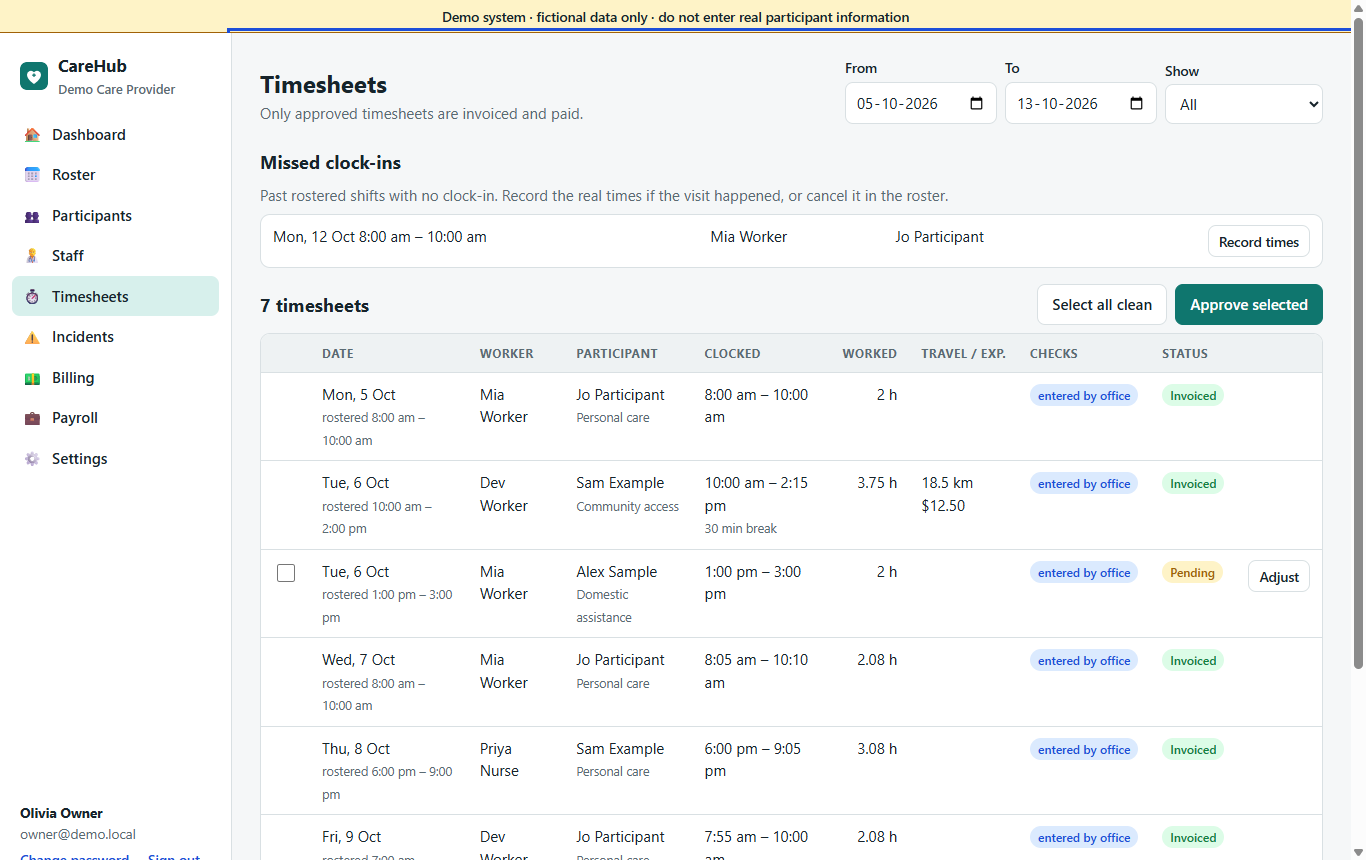
- Rostered against actual times for every visit, with time away, breaks, km and expenses.
- Flags when a worker clocked in late, far from the place, without a location, or offline.
- The participant's signature, with who signed and when, one click away.
- Approve all clean visits at once, or set rules that approve them for you and say why one was held.
- Columns of your own, a lock on a finished pay period, and a CSV export.
- Only approved timesheets are invoiced and paid.
The rest of the toolkit
One login, several providers
A worker, therapist or family member who deals with more than one provider has one login and switches organisation in the header.
Dashboard & office on a phone
What needs attention today, and every office screen usable on a phone.
Notifications
An in-app list of what needs you, and push notifications to phones.
Team messaging
Conversations between staff, one per visit, and announcements that show who has read them, kept as records.
Reports
Twelve reports, from compliance due and hours delivered to aged receivables and incidents, with print and CSV.
Calendar feeds
Private, read-only feeds of a worker's shifts or a participant's visits for the phone's own calendar.
Open API
A versioned API with scoped tokens; writes follow the roster's own rules.
Roles & permissions
Built-in roles plus custom roles, for jobs like a finance officer or a team leader.
Company settings
Your logo and invoice layout, checklist templates, a "rules in force" list and a settings history.
Try it yourself
The private demo runs on the Premium plan, with fictional participants and staff.