
Everything a support worker needs, on the phone they already have
No app store, no training day. Workers open a link, sign in, and add CareHub to their home screen. It works on Android and iPhone.
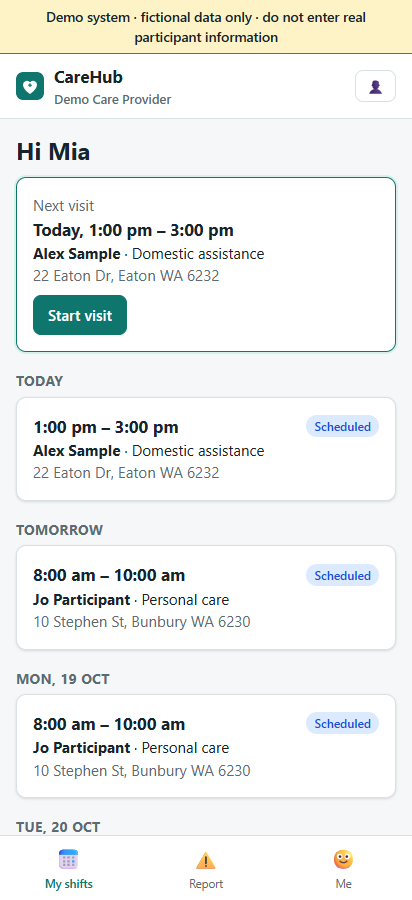
The next visit, front and centre
- Today's and upcoming shifts, with the next visit highlighted.
- Offers to accept or decline, open shifts and the job board, and requests to reschedule or swap.
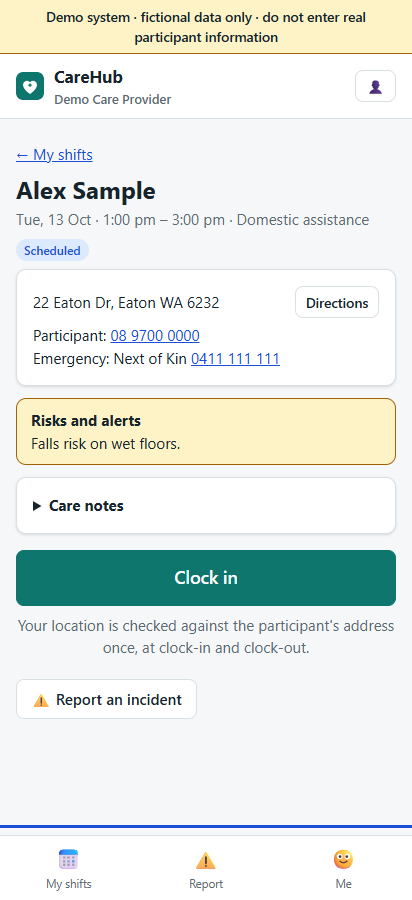
- The participant's risks and alerts, care notes, a handover from recent visits and the coordinator's instructions.
- Directions to the start place, and tap-to-call for the participant and emergency contact.
- Shifts in the phone's own calendar through a private feed, if the worker wants it.
A complete record in a few minutes
GPS clock-in and clock-out
Location is checked against the start place at clock-in and the end place at clock-out. It is not tracked during the visit. A worker can step out and come back; the time away is neither billed nor paid.
Care plan tasks and medication
The day's tasks from the care plan to tick off, and the doses due during the visit to record as given, refused, missed or withheld.
Notes, by voice if they like
Templates with headings, drafts saved while writing, a prompt when a note is thin, and the phone's own dictation. Notes can be shared with the family when appropriate.
Participant sign-off
The participant or their carer signs with a finger; CareHub records who signed and when.
Breaks
Start and end a break in the app; CareHub works out the unpaid time and asks why a planned break was not taken.
Km and receipts
Km with the participant and km between visits, kept apart; each expense with a photo of the receipt for the office to approve.
Incidents and reports
Report an incident from the visit screen while the facts are fresh, record a restrictive practice, or report a repair at a SIL house.
Messages
A conversation with the office about the visit, and announcements, inside CareHub instead of personal chat apps.
No signal? Keep working
The next day's visits are kept on the phone. Clock-ins, breaks and notes made offline are sent when the connection returns, marked "recorded offline" for the office.
Their own details, kept current by them
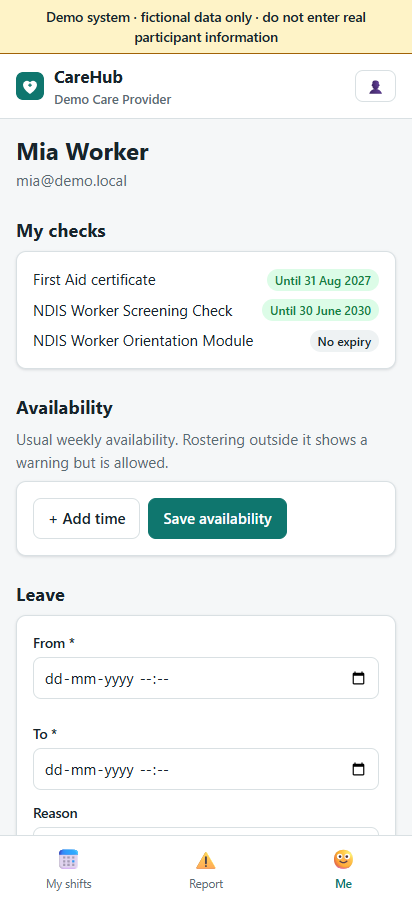
- Check expiry dates, and the organisation's policies to read and confirm.
- Usual availability, including overnight slots, and one-off "not available" days.
- Leave requests by type, which they can cancel.
- Their password, two-factor sign-in and an optional card that families see.
- One login for every provider they work for, with a switcher in the header.
Joining takes a few minutes
Open the invitation link
The office gives each new worker a personal link.
Fill in the details
Contact details, the NDIS check number, availability, and a password only they know. The office reviews and approves.
Add to home screen
Android: Chrome menu ⋮ → Add to Home screen. iPhone: Safari Share → Add to Home Screen.
Good to know
- Workers only see their own shifts and the participants they are rostered with.
- Clock-in opens up to two hours before a shift starts.
- A worker is never stopped from recording a visit because of distance; the office sees the distance, and can ask for a reason.
- The phone keeps only the worker's own visits for about a day, and clears them at sign-out.
- Receipt photos wait for a connection.
- Offline recording, break tracking, km between visits and receipt photos come with the Standard plan and above; care plan tasks and medication with Premium. See Pricing.
Try it on your own phone
Open the demo on your phone and sign in as the support worker.