
Families informed, without phone tag
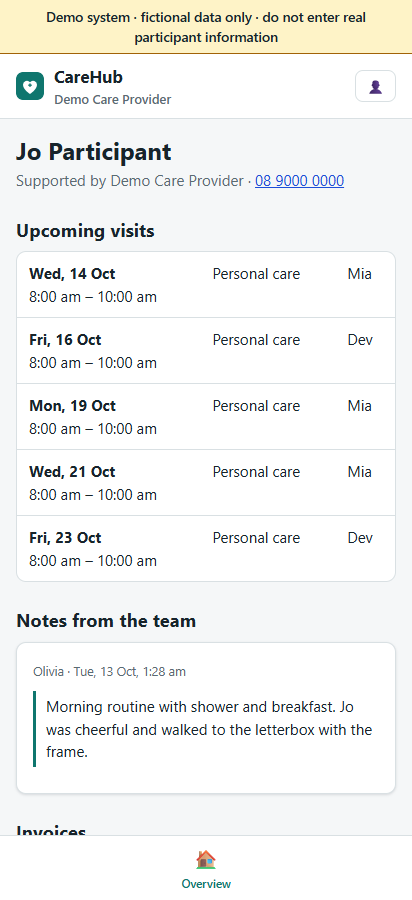
Participants and their families get their own login. The office decides what each person sees, and nothing a family does changes the roster by itself.
The visits, the notes and the money, in plain words
- Upcoming visits for the next four weeks and which worker is coming (first name), and recent visits with their sign-off.
- A "what changed" list: visits added, moved, given another worker or cancelled since they last looked.
- Progress notes the team has chosen to share. Clinical and coordination notes are never shared by default.
- Cards that workers choose to write about themselves, approved by the office.
- Invoices, and statements with payments and balances. NDIA-managed invoices are shown as "claimed from the NDIS, nothing for you to pay".
- Optionally, the plan's budget by category: funded, used and remaining.
- A group visit shows as a group session, never the other participants.
Ask, rather than phone
Visit requests
Ask for a new visit, a different time or a cancellation. Before a cancellation is sent, the portal says whether it counts as short notice under the NDIS rules.
The office decides
Requests appear in the roster beside workers' requests. The office makes any change itself, so every roster check still runs, and the family sees the decision.
Forms and feedback
Fill in forms the office assigns, and send feedback, compliments or complaints.
Several participants
A parent supporting two people has one login and picks the participant.
Several providers
A family dealing with more than one provider that uses CareHub has one login and switches between them.
Phone calendar
Where the office allows it, a private calendar feed of the participant's visits, showing by default initials instead of names and the suburb instead of the address.
You choose what each person sees
- Link a login to one or more participants, with the relationship: the participant, a parent, guardian, nominee or other.
- Turn each part of the portal on or off per link, or set defaults for the organisation.
- End a link at any time; archiving a participant ends access that depended on them.
Not in the portal
- Messaging with workers.
- Payments or document uploads by families.
- Changing the roster directly.
- Email or push messages to families.
See it as a family member
Sign in to the demo as the family login, which follows two fictional participants.